A transaction with manual approval expires if it is not approved in time.
What should you do if a transaction expires? You have 2 options:
Duplicate the transaction
However it is possible to create a new transaction by duplicating it.
During duplication of a transaction, a new authorization request is made with the card number that corresponds to the original transaction.
This transaction does not have a payment guarantee.
To duplicate the expired transaction:
- Sign in to your Merchant Back Office:
- Locate and select the transaction,
- Click Duplicate.
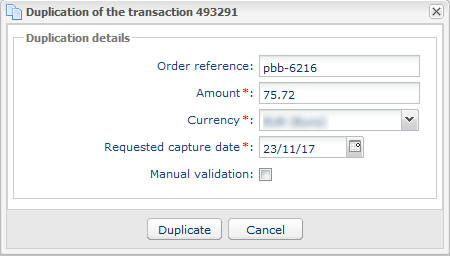
- Modify the field if necessary.
- Click Duplicate.
Send a payment link
Send a payment Link to the buyer:
- Sign in to the Merchant Back Office.
- Go to the Management > Payment orders menu.
- If the tab is not available, contact the E-Banking Merchant Support Service to subscribe to the Payment Link option.
- Click the Add button.
- Click on the Payment order of your choice.Example: Create an order via e-mail.
- Enter the amount of the payment order.
- Enter the Buyers email in the parameters to.
- Modify other parameters as required.
- Click Send button.